


MySynchrony
4.525.28K Reviews
App Specs
- Version
- 6.0.0
- Updated On
- License
- Free
- Downloads
- 5,000,000+
- Developer
- Synchrony
- Categories
- Finance
- Platform
- Android, iOS
Screenshots


 Analysis by AppCompare
I see MySynchrony as a practical account-management app, not a replacement for a full budgeting or banking hub. Its value is clearest when you already use Synchrony accounts and want a focused way to check activity and handle payments from your phone. If you expect one app to organize every account you hold, this is a narrower tool—and that distinction matters before you install it.
Where a focused account app earns its place
On an ordinary day, the benefit is less about doing something complicated and more about removing a few small hassles. You can check an account without reaching for a laptop, review recent activity, and use payment reminders to keep a due date in view. For someone who prefers to deal with account tasks as they come up, that focused routine can be more useful than a finance app crowded with charts and unrelated features.
A realistic example: I might remember a payment while waiting for an appointment, rather than after getting home and forgetting again. I can open the app, check the account activity, and make a one-time payment if that is what I need. If a payment is regular, recurring payments offer a different option. I would still review the schedule and payment history instead of assuming automation means I never need to check in.
What to consider before making it your main finance app
The biggest trade-off is its scope. A dedicated Synchrony app keeps attention on Synchrony accounts, while a budgeting app or a broader account aggregator may be more convenient if your goal is to see balances and spending across several financial providers in one place. Those alternatives can make it easier to build a whole-household overview, but they are not automatically better for handling a Synchrony account directly. I would choose based on the task I do most: consolidated planning or account-specific upkeep.
It is also worth separating reminders from financial planning. A reminder can help me remember a payment date, but it does not decide how much I can afford to pay or whether a purchase fits my budget. I would pair the app with whatever method I already use to plan monthly spending, especially if I have several bills landing around the same time. That keeps a convenient payment workflow from being mistaken for a complete money-management system.
Who is likely to get the most from it
This makes the most sense for people who actively manage Synchrony accounts and want a mobile route to account activity and payments. It can suit someone who checks transactions regularly, prefers to handle a bill away from a computer, or benefits from having reminders close at hand. The app is free, and its Everyone content rating makes it broadly suitable from a content standpoint; the practical question is whether you have Synchrony accounts to manage.
I would skip it as my primary finance app if I needed a combined view of accounts from many banks, detailed budgeting tools, or a place to manage bills unrelated to Synchrony. In that situation, a general finance app may be a better everyday dashboard, while MySynchrony could still serve as the direct account tool. Keeping those roles separate is often less frustrating than expecting one app to cover every financial task.
Worth Reading Before You Choose

EA SPORTS FC Mobile 26 Is a Bigger Football Game, but It Takes Time

Flipboard Shows What News Apps Must Do Beyond the Feed

Switching to Android Auto Means Rethinking Your Driving Routine

Google Calendar Makes a Crowded Week Easier to Manage

Ludo King Makes the Most of the Minutes Between Plans

Baby Panda World Brings Quick Play to Modern Phones, but Its Game Library Feels Busy
Security and everyday habits
Fingerprint or face recognition, where supported by a device, can make returning to a finance app more convenient without relying on a password entry every time. I still treat that as one part of a careful routine: use a device lock, avoid checking sensitive account details on a shared phone, and review activity rather than relying only on notifications. Biometrics make access easier; they are not a reason to stop paying attention to account activity.
For a smoother first session, I would have my account details ready and allow enough time to get oriented rather than trying to set everything up in a hurry. After signing in, I would check that the accounts shown are the ones I expect, look through recent activity, and decide whether reminders or recurring payments fit my habits. A recurring payment is convenient when the amount and timing are predictable; when either can change, a manual check before paying may feel safer.
The Basics of MySynchrony
First things first, the app is available on both Android and iOS, making it super accessible for most smartphone users. Downloading it is a breeze, and once you open MySynchrony, you're greeted with a clean and intuitive interface. This is crucial because, let's be honest, nobody wants to navigate a cluttered app when dealing with finances.
Getting Started
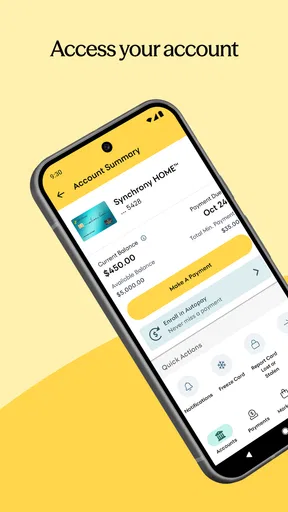
Setting up your account on the app is straightforward. You'll need your account details handy, but once you're in, everything is laid out clearly. The dashboard is your go-to place and gives you a snapshot of all your accounts. It's like having a financial overview at a glance, which is incredibly handy, especially if you're someone like me who likes to keep tabs on everything.
Features That Stand Out
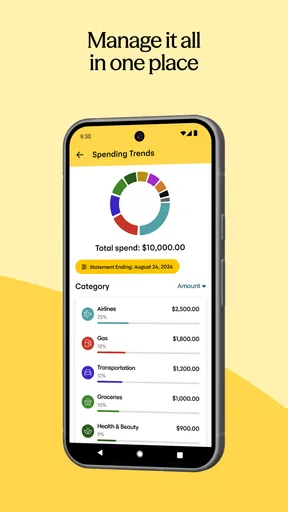
One of the standout features is the ability to view your account activity. You can easily see recent transactions, which helps in keeping track of spending and ensuring there are no unexpected charges. Another neat feature is the payment reminders. If you're prone to forgetfulness, these notifications are lifesavers, ensuring you never miss a payment deadline.
The app also offers secure access with fingerprint or face recognition, depending on your device. This adds an extra layer of security, which is always a plus when dealing with financial data. In today’s digital age, knowing your information is safe brings peace of mind.
Managing Payments Made Easy
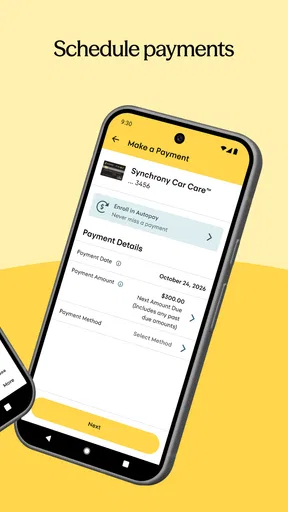
Making payments through the app is seamless. You can set up one-time or recurring payments, which is perfect if you like to automate your bills. The app also allows you to view your payment history, so if you ever need to check on past transactions, it's right there at your fingertips.
One thing that really impressed me is the promotional offers section. If you're someone who enjoys taking advantage of promotional financing, this feature is a goldmine. It keeps you informed of all the ongoing offers, so you can make the most out of your purchases.
Customer Support
We all know how frustrating it can be when things go wrong and you need help. Thankfully, the MySynchrony app offers solid customer support options. You can access FAQs, or if you prefer a more personal touch, there are options to contact support through email or phone. The quick response time is a cherry on top, ensuring you’re not left hanging when you need assistance.
Room for Improvement
While the app is generally fantastic, it's not without its quirks. Occasionally, the app can be a bit slow to load, which can be annoying when you're in a rush. Also, while the interface is clean, some users might find the design a bit too basic compared to more modern apps. But honestly, these are minor issues and don’t take away from the overall functionality.
Another potential downside is that it’s specifically for Synchrony accounts. If you have multiple accounts with different banks, you might find yourself wanting a more universal finance app. But if you’re primarily using Synchrony, this app is spot on.
Using it with realistic expectations
My view is that the app works best as a reliable companion for account tasks, rather than as the center of a financial plan. It is developed by Synchrony, and the emphasis on account access, activity, payment handling, and account-specific offers gives it a clear purpose. That focus is a strength when I want to deal with a Synchrony account directly, but it also explains why someone seeking extensive cross-bank analysis may prefer another tool.
The app has a 4.5 average from around 67,000 ratings, with more than 5 million installs. Those figures suggest that many people find a reason to keep it, but popularity alone does not tell me whether it suits an individual routine. I would weigh them alongside the practical fit: whether I have Synchrony accounts, how often I manage them on my phone, and whether I need functions beyond account servicing.
Version, compatibility, and a sensible decision
The current version is 5.5.1, and the app requires iOS 11 or later. Before downloading, I would check that my device meets that requirement and that I am choosing the app for a Synchrony account rather than expecting a universal finance dashboard. Since it is free, trying it does not require an upfront purchase, but setting up a dedicated account app is still worthwhile only if its narrower job matches what I need.
If the app feels slow during a rushed moment, I would avoid leaving an important payment until the last possible minute. Checking activity and payment history when I have time gives me a chance to spot a concern without pressure. For account questions that need more than a quick look, the support options can be a route to help, while the app itself is most useful for routine checks and straightforward payment tasks.
Final Thoughts
All in all, MySynchrony is a solid app for anyone managing their Synchrony Bank accounts. It's practical, user-friendly, and packed with features that make managing your finances a lot less of a headache. While it might not be perfect, its benefits far outweigh the minor drawbacks. For anyone looking to streamline their financial management, this app is definitely worth checking out.
If you’re ready to give it a go, you can download it from the Google Play Store or the Apple App Store. Trust me, once you start using it, you’ll wonder how you ever managed your accounts without it!
My recommendation is straightforward: use it if Synchrony account access and routine payments are the tasks you want close at hand; look elsewhere for a single app to plan spending across all your providers. With that expectation, its focused design is easier to appreciate, and the occasional loading delay or basic presentation is easier to judge in context.
Pros
- User-friendly interface for easy navigation.
- Real-time account updates and notifications.
- Secure login with biometric options.
- Multiple payment options available.
- 24/7 customer support accessible via app.
Cons
- Limited features compared to desktop version.
- Occasional login issues reported by users.
- Requires stable internet for optimal performance.
- Some features hidden in submenu.
- No dark mode for better night visibility.
FAQs for MySynchrony
What is MySynchrony and what does it offer?
MySynchrony is a mobile app that allows users to manage their Synchrony Bank accounts conveniently. It provides features such as checking balances, making payments, and viewing transaction history. The app aims to streamline financial management for account holders, offering a user-friendly interface and robust security measures to protect sensitive information.
Is MySynchrony available for both Android and iOS devices?
Yes, MySynchrony is available for download on both Android and iOS platforms. Users can find the app on the Google Play Store for Android devices and the Apple App Store for iOS devices. This ensures that a broad range of users can access their accounts seamlessly across different mobile operating systems.
How secure is the MySynchrony app?
The MySynchrony app employs advanced security features to protect users’ financial information. It uses encryption to safeguard data transmission and offers secure login options, such as fingerprint authentication or facial recognition, depending on the device. Regular updates also enhance its security posture, keeping user data safe from unauthorized access.
What are the key features of the MySynchrony app?
The MySynchrony app offers a variety of features that enhance user experience. Key features include account balance tracking, payment scheduling, transaction history viewing, and secure messaging with customer service. Users can also set up alerts for due dates and other important notifications to manage their accounts effectively.
Are there any fees associated with using the MySynchrony app?
Downloading and using the MySynchrony app is free of charge. However, users should be aware that standard data rates from their mobile service provider may apply. Additionally, any applicable fees related to their Synchrony Bank account will still apply, such as interest charges or late payment fees, if applicable.


